
 Blog
Blog
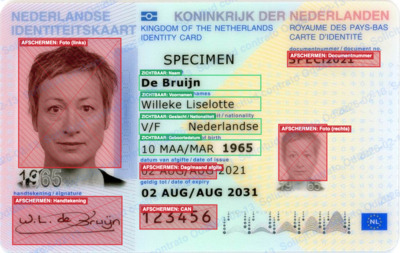
Dutch telecom provider Odido recently confirmed a data breach affecting 6.2 million customer accounts. The exposed data included dates of birth, passport numbers, and validity dates. ID scans were not leaked this time, but the incident is a timely reminder of what is at stake when organisations store sensitive identity documents without adequate safeguards. Knowing how to protect digital copies of your ID before handing them over is one of the most straightforward steps you can take to limit the damage if a breach does occur.
What should you mask?
When sharing a copy of your ID card or passport, you should mask every field the recipient does not strictly need. In practice, that typically includes:
- National identity number (the NI number in the UK, BSN in the Netherlands, NIE or DNI number in Spain, and equivalent numbers in other countries)
- Your photograph
- Your signature
- The Machine Readable Zone (MRZ) — the two or three lines of coded characters at the bottom of the document that encode personal data in a format designed for automated reading
- QR codes, where present (newer Dutch ID cards, for example, encode the BSN in a QR code)
- The document number, unless the recipient has a specific requirement for it
Masking means permanently obscuring those fields in the image or PDF before you send it — not simply cropping or folding the physical card.
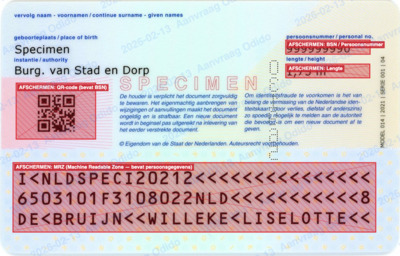
Add a watermark
After masking, add a watermark that states the purpose and the date, for example: 2026-02-13 Odido contract application. This makes it clear that the copy was provided for a specific purpose at a specific moment. If that copy were ever to surface elsewhere, the watermark creates an audit trail and discourages unauthorised reuse.
Tools to help
Any image editor or PDF tool can produce a masked and watermarked copy. On the web, Belgium offers a convenient free tool at kopieid.be that guides you through the masking process step by step. For the Netherlands, the government provides the KopieID app via the App Store and Google Play. For other countries, general-purpose tools such as Preview on macOS, LibreOffice Draw, or any PDF editor are sufficient — the key is to do it consistently, every time.
If you send the masked copy by email or messaging app, consider encrypting the file as well, so that in principle only the intended recipient can open it.
Extra step: digitally sign the copy
After masking, you can go one step further and digitally sign the copy using a qualified electronic signature, obtained through a Trust Service Provider listed on the EU Trusted List. A qualified electronic signature creates cryptographic proof of who signed the document and when. This means you can demonstrate that you provided this specific copy at a specific point in time, and not someone who came into possession of it later.
It is important to note that the digital signature proves the when and the who, but not the purpose. That is why the watermark text matters: it records the purpose in the document itself, before the signature is applied.
Under the EU eIDAS Regulation, a qualified electronic signature issued by a Trust Service Provider in any EU member state is legally recognised across all 27 member states. This makes it a practical option regardless of where you are based within the EU.
What does the law say?
Not every organisation is permitted to store a full, unmasked copy of your ID. Rules vary by country, but the data minimisation principle under UK GDPR applies in the United Kingdom, just as it does under the EU GDPR. Organisations must collect only what is strictly necessary for the stated purpose.
The UK's Information Commissioner's Office (ICO) sets out your right to data minimisation clearly: you can challenge an organisation that asks for more information than is genuinely needed. In the Netherlands, only employers and banks have a legal basis for retaining a full copy of an ID card; telecom providers, for example, are required to mask the BSN and the photograph. The principle is the same across the EU and the UK — only collect what is necessary, and protect what you do collect.
If an organisation asks you for a full unmasked copy and cannot explain why each field is required, you are entitled to question that request.
